Guide to change IP with SSTap Software
🚀 SSTap: Super Easy “IP Changing”, Gaming, and Firewall Bypassing!
SSTap is an application that helps you browse the web more securely and privately by “hiding” your real IP address. This application uses “intermediate connection ports” (Proxy servers) with many options such as SOCKS 5, HTTP, and Shadowsocks. The great thing about SSTap is that it’s very easy to install, and the interface is simple and easy to use. You just need to select the type of connection port, add the address (even from a ready-made link), and then connect. SSTap also has advanced options for you to customize your network connection as you wish.
What makes SSTap different from other IP changing software?
While Proxifier and ProxyCap are familiar SOCKS5 client software, SSTap offers a unique approach: VPN over SOCKS5. Simply put, SSTap is a VPN software but leverages the power of SOCKS5 to connect. The biggest advantage of this combination is the ability to easily bypass internet blocking measures (for example, in China). SSTap operates at the routing level, allowing you to play online games smoothly, without “stuttering” like when using software that only “hooks” (interferes) with the connection.
Image guide to change IP with SSTap
Download and Installation Guide
Go to Google and type the keyword “Download SStap” or go directly to the link https://sourceforge.net/projects/sstap/files/latest/download
After downloading, extract the file and run the installation file, following the simple steps like installing other software.
Guide to using SSTap to change IP
After installation is complete, you will see the interface as below.
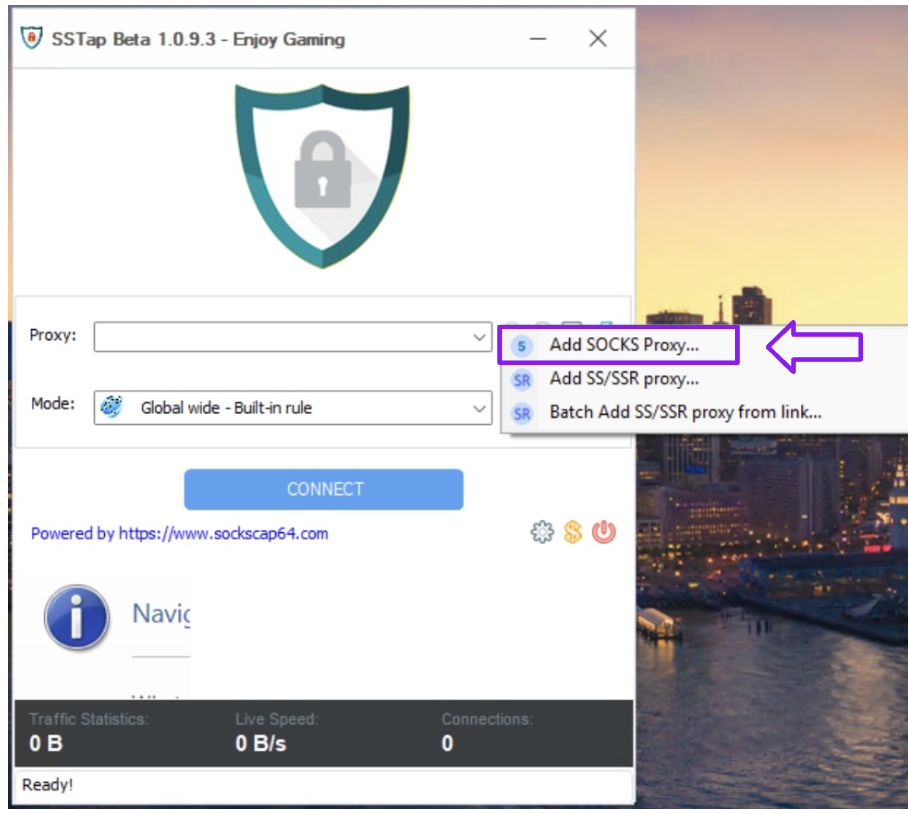
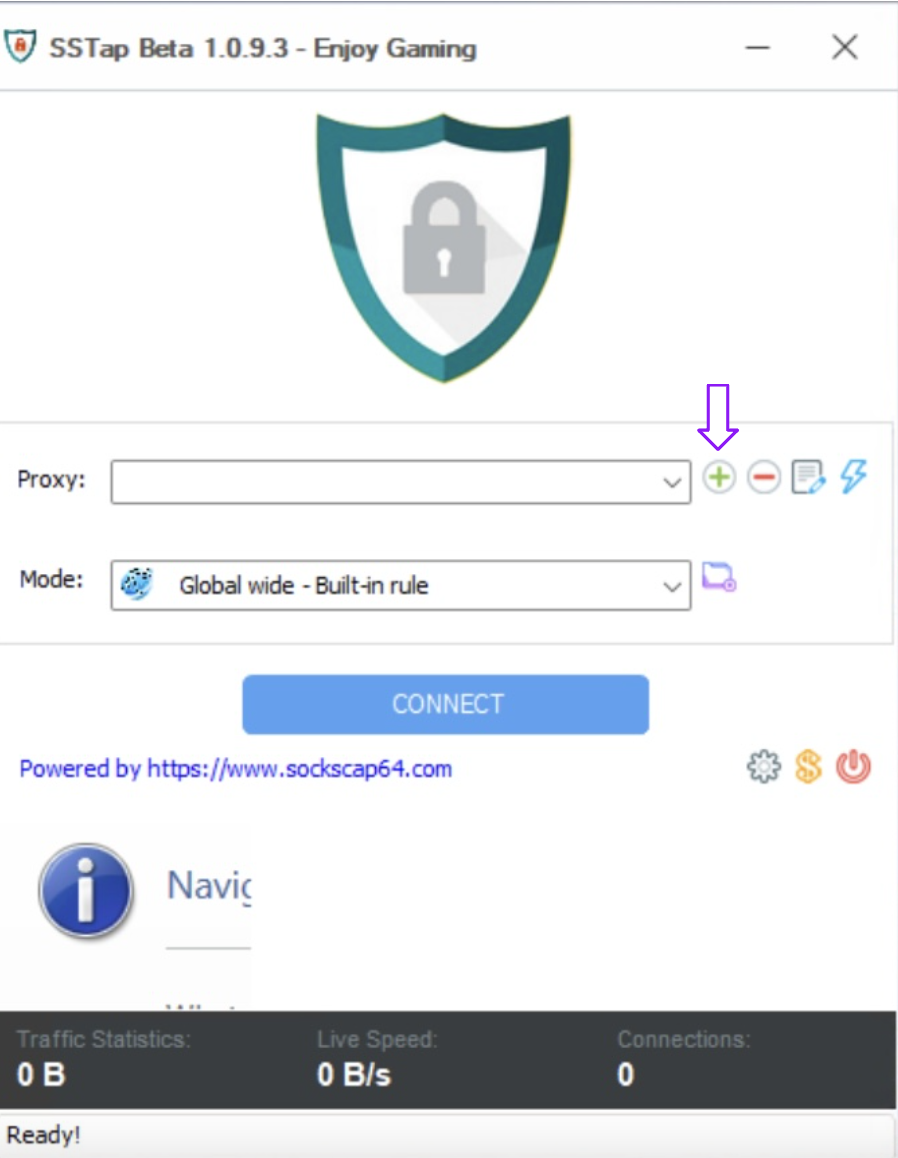 Click on the (+) sign to add a new SOCKS5. Then you will get the interface as follows:
 Then enter all the information as shown below and save it.
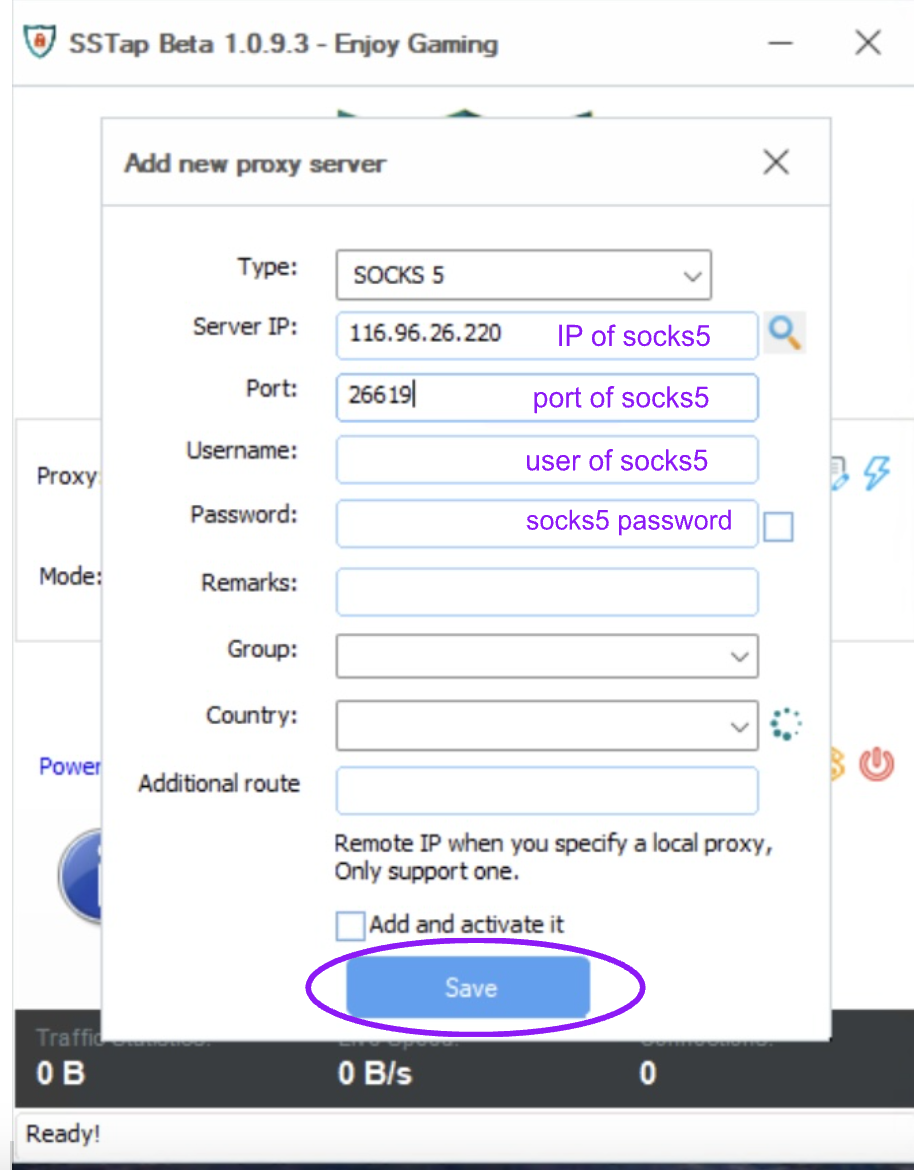 Finally, press the Connect button to use it.

The status "UDP relay successful" in the context of SSTap (and similar software using SOCKS5, Shadowsocks, VPN…) means:
- UDP connection has been established: The application (e.g., game, VoIP application, streaming application…) is now able to send and receive UDP data through the proxy/VPN server that SSTap is using.
- UDP packets are forwarded correctly: UDP packets from your application are encapsulated by SSTap and forwarded to the proxy/VPN server, then this server forwards them to the final destination (e.g., game server). The reverse process (from the game server back to your machine) also takes place similarly.
- No errors during transmission: No UDP packets are lost, corrupted, or blocked during transmission through the proxy/VPN.
Why is UDP relay important?
- Online games: Many online games use the UDP protocol to transmit real-time data (such as player positions, actions…) because UDP is faster than TCP (although less reliable). If UDP relay is unsuccessful, you will not be able to play the game or the experience will be very bad (lag, disconnection…).
- VoIP and Video calls: Voice and video call applications (such as Skype, Zoom, Discord…) also often use UDP to transmit audio and video. Successful UDP relay ensures your calls are not interrupted, and the audio and video are clear.
- Streaming: Some video/audio streaming services may also use UDP.
- Firewall bypassing: Some firewalls block UDP, preventing you from using the applications/services above. SSTap (and similar software) can help bypass this UDP blocking by “hiding” UDP traffic within a TCP or Shadowsocks connection."
Above is the article Guide to change IP with SStap software. It is also quite simple, you can experience other functions that we have not implemented. Good luck!
In addition, we have many instructions for using http proxy / socks5 on various software and tools. Please click on the link https://docs.tmproxy.com/guide/
Where to buy reputable, high-speed proxy, socks5?
- Visit TMProxy.
- Create a TMProxy account ☒ Login.
- Buy the Proxy package you need.
- Set up configuration ☒ Save configuration ☒ Get IP.
- Get information to set up Proxy.
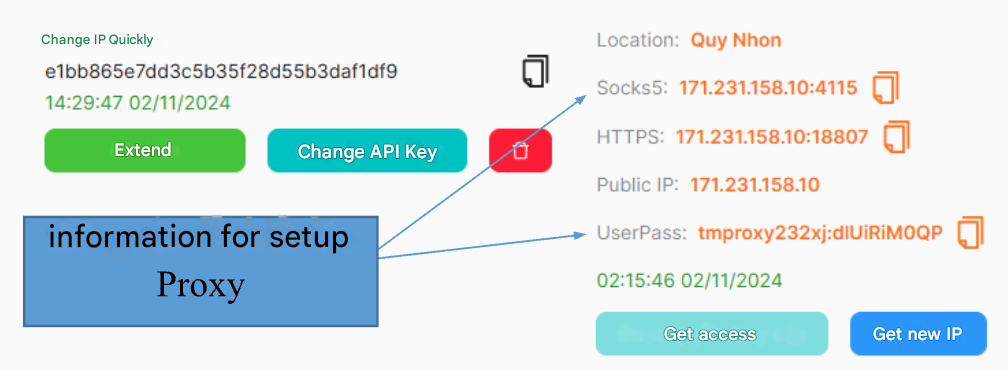
Attention!
To use the automatic IP rotation function, you need to configure the settings in the TMProxy Manager software(click here to download the software). See instructions here
Get started with us at:
- website: https://tmproxy.com/
- Fanpage: https://www.facebook.com/TMProxy