TMProxy Extension
What is TMProxy Extension?
TMProxy provides you with a browser extension that helps protect your privacy or access restricted content. In addition, TMProxy Extension helps improve security that can prevent cyber attacks or unauthorized access.
How to use TMProxy Extension
1. Create a TMProxy account
- Visit TMProxy.com to register.
- Or you can quickly log in with your Google account.
2. Software required to use TMProxy Extension
- Software download link:
Chrome: TMProxy Chrome Extension
Firefox: TMProxy Firefox Extension
3. Create Key and use Proxy for Extension
a. Create Key:
Visit https://TMProxy.com/ and log in.
Choose the appropriate Proxy package.
Buy package ☒ confirm ☒ Create Key successfully.
- When creating a Key successfully, select the network operator as VNPT or Viettel (configuration ☒ ISP ☒ Select the network operator you want).
- When creating a Key successfully, select the Proxy location where you want (configuration ☒ Location ☒ the location you want).
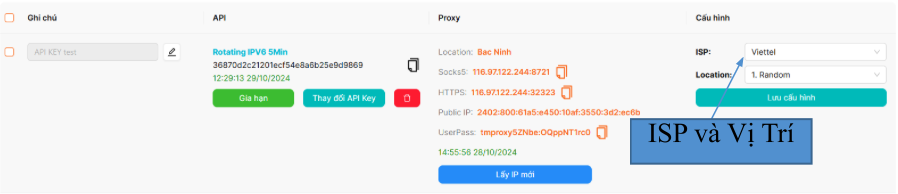
b. Use Proxy for Extension:
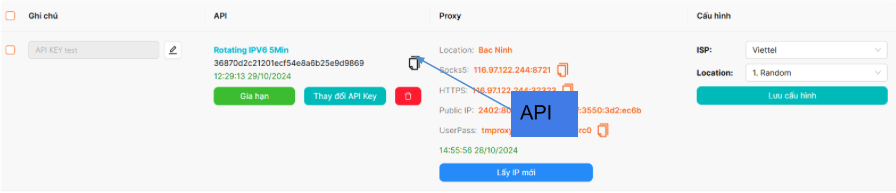
Copy the API of the API KEY item ☒ paste the copied API into the Extension ☒ Connect to API.
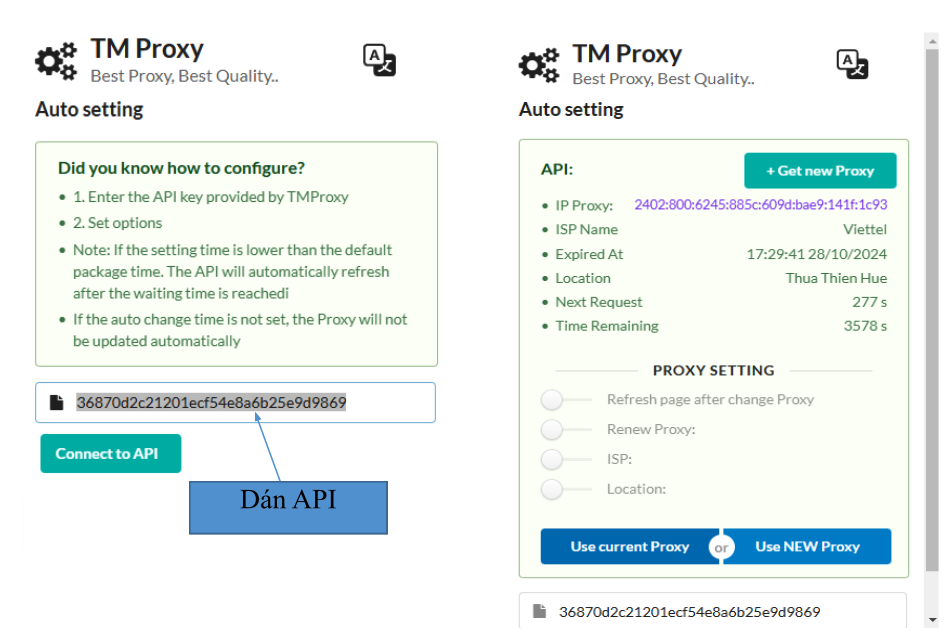
Proxy Setting section ☒ enable Refresh page after change Proxy.
Proxy Setting section ☒ select ISP and Location to select the network and location you need.
- After adjusting Proxy Setting, select Use Current Proxy to use Proxy.
- Visit IP.me to check Proxy.
Note:
- Get new Proxy select Get New Proxy (Get but not used yet). To use, select Use Current Proxy.
- Use new Proxy and apply configuration select Use New Proxy.