TMProxy with Android, Emulator
TMProxy with Android, Emulator
Why set up a Proxy for Android and Emulator?
Do you need to improve security, privacy or enhance the ability to access restricted content for your Android and emulator? TMProxy will help you do that.
Set up Proxy for Android and emulator
- Open settings.
- Open “Network and Internet” > Wi-Fi
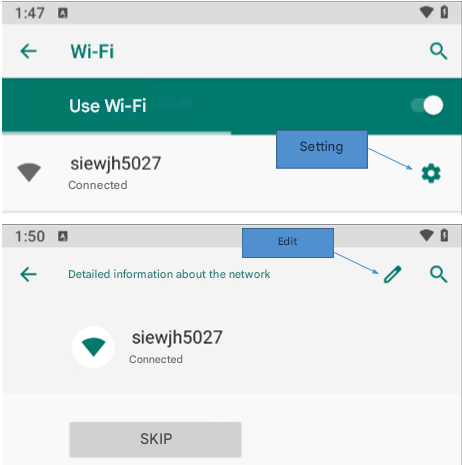
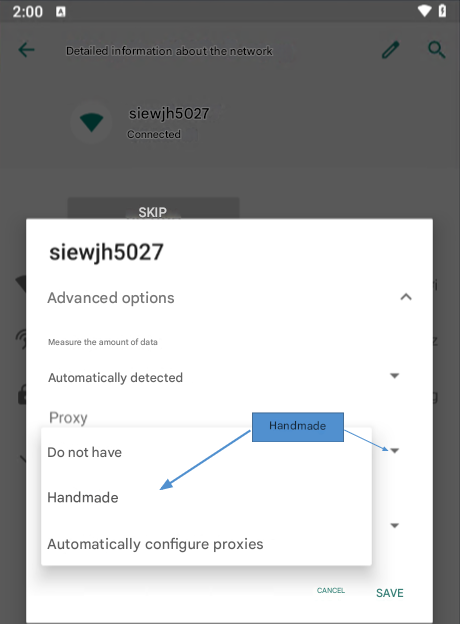
- In the Proxy section ☒ manual
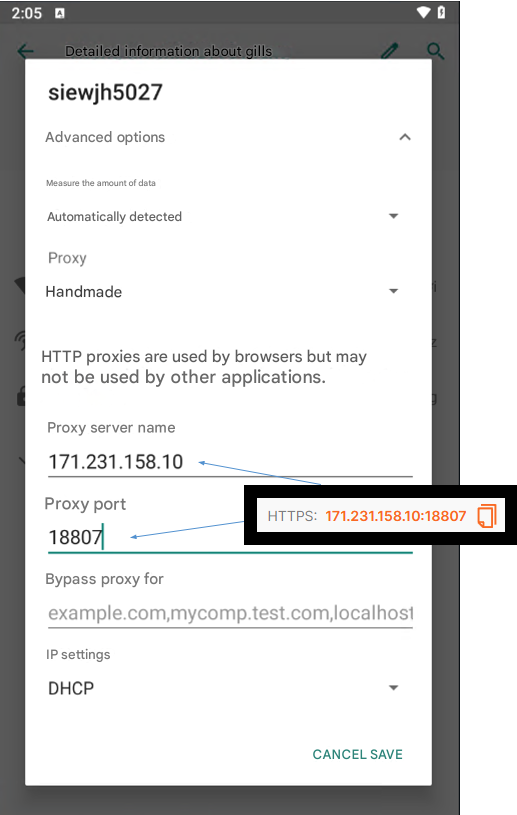
- Enter the details and login information of the Proxy server. ☒ Save
- Check Proxy access IP.me.
Get information to set up Proxy
- Visit TMProxy.
- Create a TMProxy account ☒ Login.
- Buy the Proxy package you need.
- Set up configuration ☒ Save configuration ☒ Get IP.
- Get information to set up Proxy.
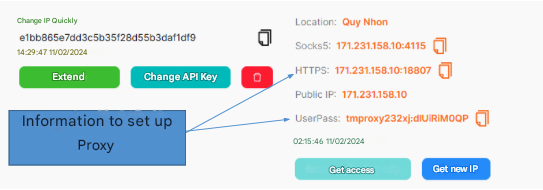
Attention!
To use the automatic IP rotation function, you need to configure the settings in the TMProxy Manager software(click here to download the software). See instructions here